01
Find your place in the turn.
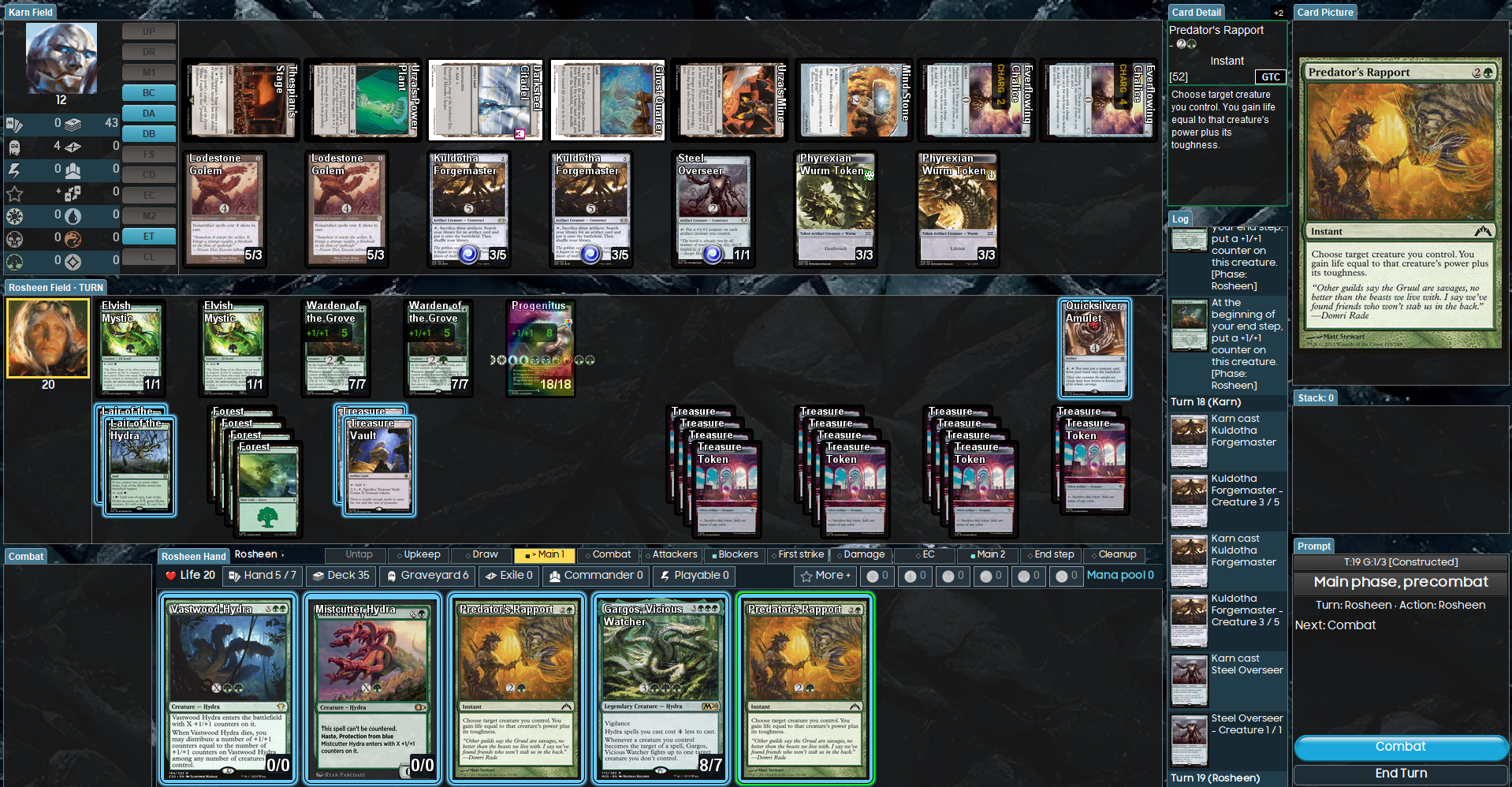
A highlighted portrait and horizontal phase strip show whose turn it is and where you are. Action buttons say Resolve, Combat, or Confirm blocks.
An Illiterally Custom · UI Addon for Forge
Illiterally's Enhanced Rules Analysis UI
Forge crushes it at managing the rules and data. I wanted to build on that work with a UI Addon for learning the game, teaching modes and formats, and finding your bearings on a busy board.
v0.1.12 Windows desktop Forge 2.0.14
Why this exists
Forge’s creators and contributors built the rules engine, card data, and simulation that make this possible. I’m grateful for the work they’ve shared, and for the chance to contribute something in the same open-source spirit.
People take in information differently. IERAUI adds visual cues around timing, resources, and interactions to help newer players follow the sequence, and to support anyone who can feel overwhelmed by everything happening on screen.
The aim is to make Forge an even more useful place to teach, experiment, and understand how the game works. You choose what to try; Forge handles the rules, and IERAUI helps you follow along.
In this release
A highlighted portrait and horizontal phase strip show whose turn it is and where you are. Action buttons say Resolve, Combat, or Confirm blocks.
Tap Mana points out source choices in blue. A small Auto button stays available. Zones, mana symbols, and the pool tally share one compact bar.
A small prompt appears beside the card you’re using. Drag it from the top area when it gets in the way. The main Prompt stays available.
Card outlines draw attention to available actions. Current power and toughness are easier to read. Flash has a separate reminder, without an affordability glow.
Small signed changes appear by resource totals. New Stack entries get a cue. The interface gives you a place to look when several things happen together.
A brief main-phase input guard catches rapid carry-over clicks. Layout saving keeps a previous-good backup. Tooltips wait longer before appearing.
This download is pinned to Forge 2.0.14 on Windows. It passed 66 focused checks, a clean build, and an isolated launch/match-start check.
The mana pool shows mana already produced. It does not yet calculate every source you could use. A card’s action outline is not a promise that every ability is affordable.
Reliable MAX-X, clearer cost restrictions, combat forecasts, and bigger effect feedback are still on the list. They aren’t part of this download.
Thanks to Forge’s creators and contributors for the rules engine, card implementation, AI, and deck tools that make this possible. IERAUI is an independent UI Addon by Illiterally, shared in appreciation of that work.
GPL-3.0-or-later. Source and build instructions are public. OpenAI Codex assisted implementation and checking. This addon is not endorsed by Forge's maintainers or Wizards of the Coast.
Source, license & creditsCome say hello
Find game links, project information, and updates. You’re welcome to leave a comment, ask a question, or tell us how your run went.
Follow along
@literallyilliterally